
Global Search (CmdK)
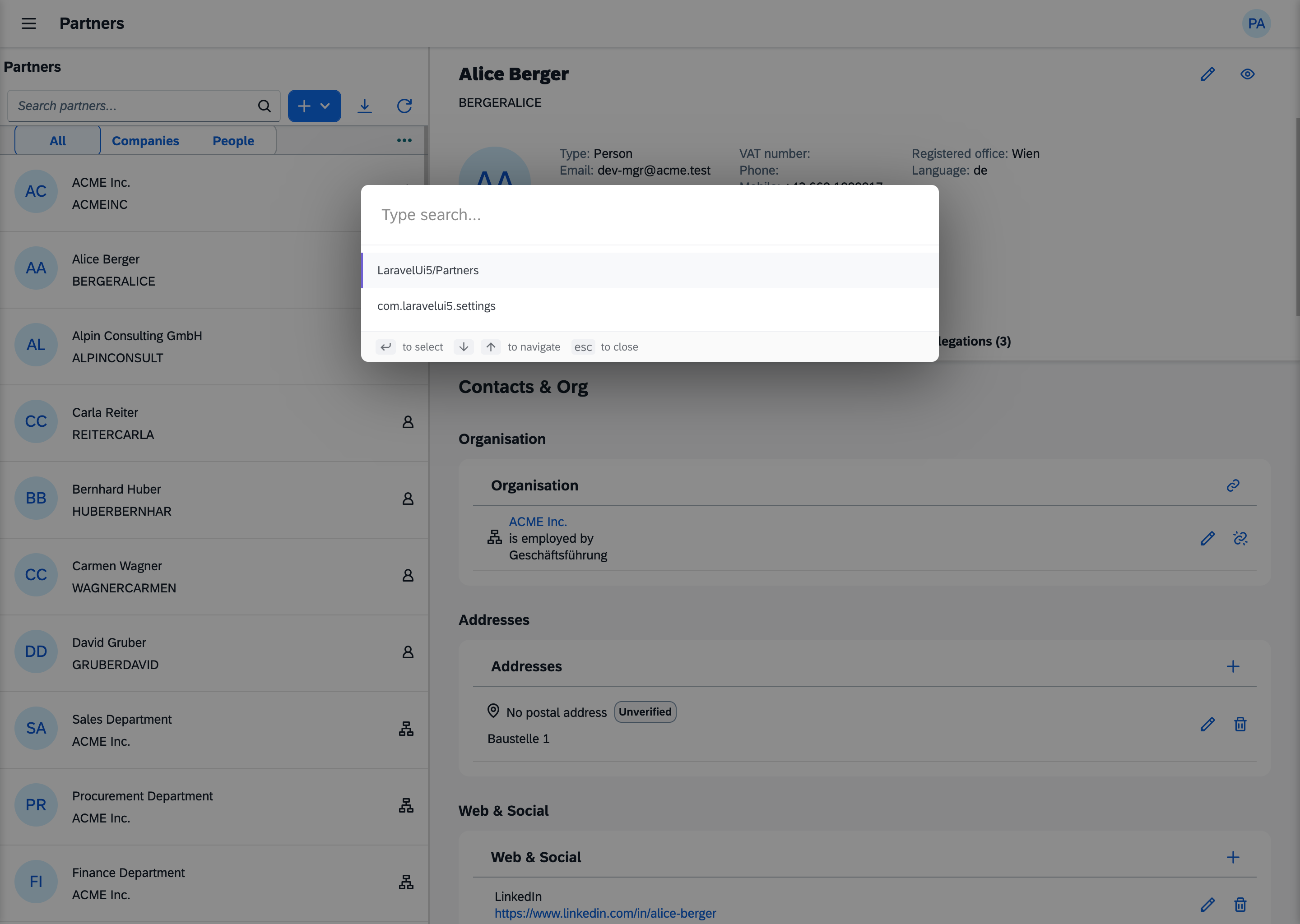
Cmd+K (or Ctrl+K) opens the command palette: one field, a list of things this actor may open, and Enter to go there. It is the shortest path through a suite that has more apps than a rail can show.
The palette is not a text search over your data. It searches artifacts — the apps, dashboards, reports and dialogs the installation has registered — and every row it offers is something the actor is allowed to open.
Needs SDK 1.2.0
On 1.1.1 the palette opens and filters in the browser, but two wire mismatches keep it from working: the client sent the search term under a different parameter name than the server read — so the server-side query never ran — and the selection event carried the chosen entry in a field the shell did not read, so Enter did not navigate. Both are fixed in 1.2.0, which also ships the rebuilt shell bundle: upgrade, and the browser gets the new main.esm.js from the package route. The page below describes the fixed behaviour.
Where the entries come from
ui5:sync writes every registered artifact into the catalog. The palette's shipped collector queries that table:
- four types only — applications, reports, dashboards and dialogs;
- excluding infrastructure artifacts, which are marked as not exposed at sync time; there is no per-app opt-out;
- matching the term against the artifact's title and description with a plain
LIKE.
So an artifact appears in the palette because it was synced and is not infrastructure. If something is missing, ui5:sync is the first place to look.
Visibility is part of the query
The palette never filters in PHP after the fact. The constrainer works out, from the registry's declarations, which artifacts the actor may open, and that list goes into the SQL as a whereIn on the namespace — no row is materialised before it is constrained.
And the filtering is an optimization, not the gate. Selecting a row dispatches an intent, and the intent is authorized again on the server (Intent Dispatch). The rule behind that split is on Visibility & CmdK.
What happens as you type
- On open, the palette is already populated: the shell's context carries a pre-fetched window of entries, so the first keystroke costs nothing.
- Below the minimum length (two characters by configuration) it refines that window in the browser, matching title and keywords.
- Above it, it first narrows the rows it already holds. It asks the server, which runs the collectors and returns the authorized rows, when the query no longer extends the previous one, when the held window was marked as too large, or when nothing matches locally.
- Too many matches — more than the configured limit, 1000 by default — and the server answers with no rows and a refine your query message instead of a page of noise. A client may ask for a smaller limit; it cannot raise the configured one.
The count is taken after visibility: it is the number of rows the actor would see, and the palette shows it in a status line under the list — N results, No results, or, past the limit, Too many results — keep typing to narrow the search. A term is never "too broad" because of rows the actor cannot see, and the number never reveals that such rows exist.
changed in 2.0Before 2.0 the count was taken before visibility, so it included rows the actor could not see, and the palette did not display it.The palette renders an icon and a title per row, as one flat list — the icon names the row's type (an app, a report, a dashboard, a dialog). The section a collector sets and the keywords it provides are carried but not displayed: keywords are matched, and sections are deliberately not grouped, because a term narrows the list within a keystroke or two and the icon already tells the types apart.
Adding your own entries
Two contracts, one config entry. A collector finds candidates; a constrainer narrows the query to what the actor may see.
use LaravelUi5\Sdk\Shell\CmdK\Contracts\CollectorInterface;
use LaravelUi5\Sdk\Shell\CmdK\Dto\Action;

final class CustomerCollector implements CollectorInterface
{
    public function count(Builder $query, SdkContext $context): int
    {
        return $query->count();
    }

    public function query(string $search, SdkContext $context): Builder
    {
        return Customer::query()
            ->when($search !== '', fn ($q) => $q->where('name', 'like', "%{$search}%"));
    }

    public function collect(Builder $query, SdkContext $context): array
    {
        return $query->get()->map(fn (Customer $c) => new Action(
            id:       "customer-{$c->id}",
            title:    $c->name,
            intent:   new WeaveOpenIntent('acme.customer', (string) $c->id),
            keywords: $c->city,
            icon:     'person',
            section:  'Customers',
        ))->all();
    }
}
Three rules the contract insists on, and they are what keep the palette honest:
count()counts the query it is given —query()already narrowed by the constrainer — and adds no constraints of its own. The service calls it beforecollect(); past the limit nothing is fetched.query()returns a builder, not results. The constrainer needs something it can still narrow.collect()must not filter. Anything decided in PHP after the query is a leak waiting to happen.
The constrainer is an adapter onto a Security visibility resolver — it does not invent a rule, it applies one:
final class CustomerConstrainer implements VisibilityConstrainerInterface
{
    public function __construct(private CustomerVisibilityResolver $resolver) {}

    public function constrain(Builder $query, SdkContext $context): Builder
    {
        return $this->resolver->constrain($query, $context);
    }
}
Register the pair. Note the slot is called authorizer but takes the constrainer:
// config/ui5.php
'discovery' => [
    'search' => [
        'collectors' => [
            CustomerCollector::class => [
                'authorizer' => CustomerConstrainer::class,
                'config'     => [],
            ],
        ],
    ],
],
Both branches exist for a reason: context fills the pre-fetched window in context.json, search serves the live query. A collector you want in both goes in both.
What it doesn't do
- No fuzzy matching, no ranking.
LIKEon title and description, ordered by the query. - No grouping. Sections are carried on the DTO and ignored by the renderer.
- No per-user history or favourites.
- No search over your business data unless you write the collector for it — and then the rows are yours to authorize.
See also
- Visibility & CmdK: the layering rules, and why filtering belongs in the query
- Intent Dispatch: what a selected row does
- Context API: the
actionskey that pre-fills the palette - LeanShell Overview: the shell services this is one of