
The Settings App
The SDK ships a console for settings. Administrators see every setting the installation declares and what it is set to at each scope. They change it where their authority reaches. No code is needed: the app shows what ui5:sync stored from your declarations.
It opens for partners with the settings-admin ability, which comes with the local_admin role. It sits in the navigation rail, and its tile is on the Launchpad.
On the Launchpad
The tile declares its place in the Launchpad's catalogue: Analytics & Intelligence → Data Management. The Launchpad lists its tiles flat today, ordered by weight. The catalogue's tabs come later.
Three columns
The app is a flexible column layout.
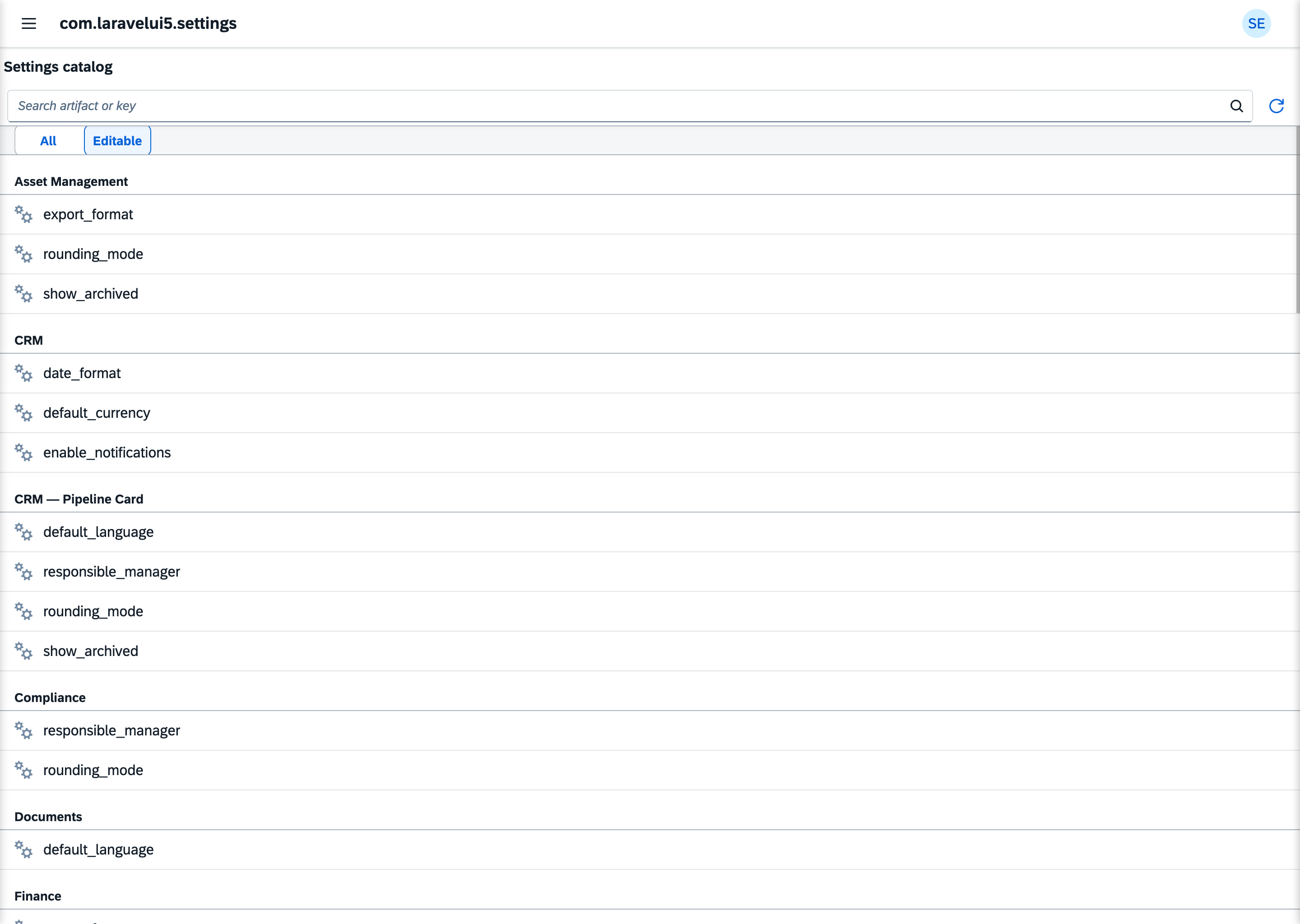
The catalogue. Every declared setting, grouped by the artifact that declares it and sorted by key. Below each key stands its description in the administrator's language, from the declaring module's bundle (Reading & Writing Settings); the editor shows the setting's title above its key. A search field filters by artifact title and key. A switch shows all settings or only the ones you may edit. A setting whose level is above your edit level is marked Read-only.
The setting. Every stored value of the selected setting, at every scope: the Platform default, each shared override and every user's personal value. A row shows its scope, its owner, the value and who set it last. The owner of a User value links to that partner in the Partners app. Where your authority reaches, you edit or reset a row.
The edit. You choose the scope, and for a User value the partner it belongs to. Only the scopes your authority reaches are offered, and a new value starts at the broadest of them. The input follows the setting's type: a switch for a boolean, a number field, a date picker, a picker for a model. An array setting gets a token field: typed elements are checked against the element type, and the elements of a model array are picked through the setting's value help, several at once. Saving and resetting pass the same checks as every change (Who may change a setting). A refused change shows its reason.
One partner's overrides
On a person in the Partners app, the Related menu carries Settings. It opens the console on partner/{partnerId}: the catalogue narrowed to the settings that person overrides, with a strip naming them. Choose a setting and their row is marked among all its values; edit or reset it as anywhere else. Close the strip and the whole catalogue returns. An organisation holds no personal values, so for one the catalogue stays empty.
The Partners app shows the same overrides on the person, read-only, each linking to its setting here. Both ways lead to the same edit.
What your code contributes
| In your code | In the app |
|---|---|
#[Setting] on an artifact | a row in the catalogue, under the artifact's title |
its type | the input |
its level | editable or Read-only, per administrator |
#[ForSetting] on a value help | the picker for a Model setting |
#[ForSetting(namespace, key, scope)] goes on a value-help artifact. It names the setting by its artifact's namespace and its key, and the value-help scope the picker opens with. One value help can serve several settings.
What it doesn't do
- It doesn't show a setting's
note. The note stays in your code. - It doesn't show Core's slot settings (
slot.*). Per-partner slot values are set in the Partners app. - It isn't for users' own settings. It opens for administrators only. A profile in the Launchpad, where users change their own settings, is planned.
- It can't be switched off by configuration. To keep it from someone, don't grant them
local_admin.
Linking to a setting
The app owns the Weave concept laravelui5.setting. Another app opens a setting's detail with the reference {artifactNamespace}/{setting}. The Partners app links its Settings tab this way.
In the other direction the app weaves into laravelui5.partner: its #[Weave] puts the Settings entry into the partner's Related menu, with the text weave.laravelui5.partner.label from its own bundle. The Partners app carries no line for it (Weave).
See also
- Reading & Writing Settings: how your code reads a setting
- Scope Precedence: which value wins
- Type Validation: what a value must look like