
The Launchpad
The SDK ships the landing zone. Every user who signs in arrives at the LUX Launchpad — a page of tiles, one per app they may open, and nothing they may not.
It is the one app in the suite that is never gated. It carries no #[Access], and it never will: that is a guaranteed invariant, not an oversight. Anyone who is signed in can reach it, which is what makes it safe to land on — after a login, after a password reset, and above all after an impersonation switch, where the acting partner may have access to nothing else. Gating it later would be a breaking change.
The SDK also owns the named route that gets people there:
GET /ui5/dashboard → redirect to the Launchpadlaravelui5/auth falls back to route('dashboard') when it has nowhere better to send someone, and so does the impersonation handler. You do not have to define it.
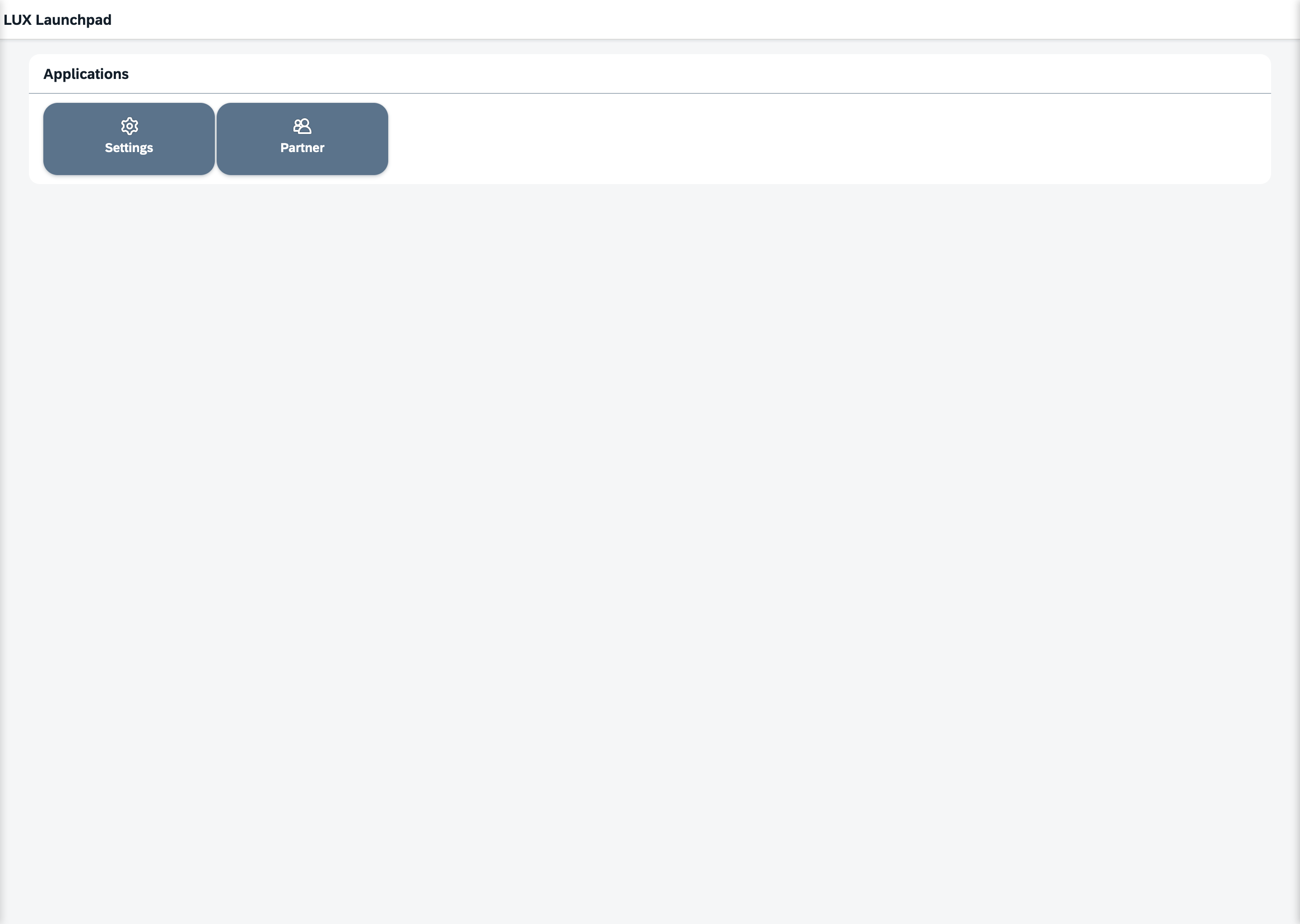
What a user sees today
changed in 3.0One panel per capability that holds a tile, until 2.x a single panel *Applications*.One page. One panel per occupied capability, in the order of the catalogue, titled with its domain and its capability — Analytics & Intelligence · Data Management — and holding the launch tiles on it that the actor may use, ordered by weight. A capability without a tile shows nothing, and a panel whose tiles are all hidden from the actor drops out. No tabs, no search, no profile menu inside the app — the identity menu and sign-out live in the shell's rail around it.
Putting your app on it
Three steps, all in your own module.
1 — write a launcher tile. A launcher is a plain GenericTile in icon mode that carries the jump in its parameters. It never navigates itself:
final class OrdersLaunchTileProvider implements TileProviderInterface // LaravelUi5\Core\Ui5\Capabilities
{
    public function getTile(array $slots, Ui5ContextInterface $context): GenericTile
    {
        return new GenericTile(
            header:     'Orders',
            mode:       GenericTileMode::IconMode,
            tileIcon:   'sap-icon://sales-order',
            layoutData: new GridContainerItemLayoutData(columns: 2, rows: 1),
            parameters: ['method' => 'navigate', 'target' => 'app:com.acme.orders'],
        );
    }
}
2 — mark the tile for the Launchpad, naming a capability of the catalogue alone:
use LaravelUi5\Sdk\Launchpad\Attributes\Launchpad;

#[Launchpad('sales_pipeline', weight: 10)]
final class OrdersLaunchTile extends AbstractUi5Tile { /* … */ }domain/capability.3 — register the tile on your own module, in ARTIFACTS, like any other tile. The Launchpad ships no tiles of its own; every tile on it belongs to the module that put it there, and disappears with that module.
weight orders the tiles on one capability — higher first, then alphabetically by namespace, never registration order. Scaffold the tile with php artisan ui5:tile rather than by hand (Artisan Commands).
The rules a launch tile follows
since 3.0php artisan ui5:describe --check holds them, and fails the build when one is broken:
- A tile lies on a capability of the catalogue, and only there. There is no section General; an app that fits no capability takes the nearest. A capability the catalogue does not know is an error in the check — and at runtime such a tile is hidden and logged, never shown in a stray panel.
- A module has at most one launch tile. A module has one root, so one app, so one door.
- A module whose app is a Concept's front door has exactly one. If your app carries
#[ConceptEntry](The front door), it is how people reach that Concept, so it belongs on the Launchpad.
The capability is also your package's place in the marketplace: the marketplace reads it from your launch tile. Only a package without one — a library, above all — names its place on the module, with #[Category(path: 'data_management')]; a path beside a launch tile is refused, so a place has one source.
Who sees which tile
A tile that opens an app is declared with #[Launchpad]. That is the rule the Launchpad's visibility rests on: a marked tile stands for its app.
A marked tile is shown to an actor if and only if that actor may open the app the tile jumps to. The Launchpad reads the answer out of the tile's own press intent — the same target the click uses — so there is exactly one declaration of the fact and nothing can drift out of step with it. A tile whose target names no app at all is hidden.
That means you do not authorize the tile. You authorize the app with #[Access] (Permission Levels), and the tile follows.
The decision is made after the tile is built, when its press intent is known, so it holds for a tile that declares required slots as well. A hidden tile is left out of the page; it is not reported as an error. If a marked tile carries an #[Access] of its own as well, the actor needs both grants.
A tile without #[Launchpad] that navigates to another app is not hidden by its target. It is decided by its own #[Access], so a tile someone deliberately granted stays visible even when the target app was not granted — the click is refused, and the SDK logs a warning naming the tile, the target and the partner, so the missing grant is found. If the tile is meant to be a door, declare it with #[Launchpad].
If a tile's provider throws, that tile is dropped and the page still renders. One broken module cannot take the landing page down with it.
The catalogue
Every launch tile names its place as a capability — a leaf of a closed catalogue of 13 domains and 48 capabilities, derived from APQC's Process Classification Framework. A capability's name is unique across all domains, so the domain follows from it.
| Domain | Label | Capabilities |
|---|---|---|
finance_performance | Finance & Performance | core_accounting · treasury_cash · tax_regulatory · fp_and_a · billing_revenue |
procurement_spend | Procurement & Spend | sourcing_contracts · procurement_purchasing · supplier_management · invoices_payments · travel_expense |
supply_chain_logistics | Supply Chain & Logistics | inventory_warehousing · supply_chain_planning · logistics_fulfillment · order_management |
manufacturing_operations | Manufacturing & Operations | production_planning · shop_floor_execution · quality_management |
product_engineering | Product & Engineering | product_lifecycle · rnd_innovation · engineering_design |
sales_marketing | Sales & Marketing | sales_pipeline · digital_commerce · marketing_campaigns · cpq |
service_cx | Service & Customer Experience | customer_support · field_service · customer_success |
human_capital | Human Capital | core_hr · talent_learning · workforce_management · employee_experience |
asset_facilities | Asset & Facilities | enterprise_asset_management · facilities_realestate · fleet_management |
risk_legal_compliance | Risk, Legal & Compliance | governance_risk_compliance · legal_contracts · security_cyber · sustainability_esg |
information_technology | Information Technology | it_service_management · integration_data · admin_governance · developer_tools |
analytics_intelligence | Analytics & Intelligence | business_intelligence · data_management · ai_automation |
workplace_productivity | Workplace & Productivity | collaboration · document_management · project_portfolio |
The machine-readable master ships with the package, at vendor/laravelui5/sdk/Sdk/resources/taxonomy/launchpad-taxonomy.json, with each node's label, icon and APQC lineage. Read it there rather than copying the table.
How to choose. Shelve your app where a buyer would look for it, not where the process is formally owned. The APQC codes in the master record lineage, and one app can legitimately span several of them. Depth stops at these two levels; there is no third.
The labels in the master document where a node comes from; what the Launchpad shows are the texts of its own bundle, domain.<slug> and capability.<slug>, in English and German. The catalogue grows with the SDK, additively; no vendor adds a node.
APQC attribution
The catalogue is a derivative work of APQC's Process Classification Framework, used under the licence APQC grants for it. That licence requires the notice to travel with every copy, including this one:
©2026 APQC. ALL RIGHTS RESERVED. This Process Classification Framework® (“PCF”) is the copyrighted intellectual property of APQC. APQC encourages the wide distribution, discussion, and use of the PCF for classifying and defining organizational processes. Accordingly, APQC hereby grants you a perpetual, worldwide, royalty-free license to use, copy, publish, modify, and create derivative works of the PCF, provided that all copies of the PCF and any derivative works contain a copy of this notice.
The catalogue derives from the cross-industry PCF. The industry-specific frameworks carry different terms; do not mix them in.
What lies ahead
The Launchpad's 1.0 is a deliberate minimum, and its final shape is not specified yet. Work known to be ahead of it:
- Tabs per domain, once a tenant's page grows too long for one column of panels.
- The profile. Two-factor settings and the settings a user changes for themselves belong here. Until it exists there is no self-service surface for personal settings, because the Settings app opens for administrators only.
- Favourites, pinning and arrangement, notifications, and in-app theme switching.
- In-app help. The Launchpad ships no help topic yet, so F1 on it opens the table of contents.
The tile arrangement is explicitly provisional: the set of apps you see and the per-tile isolation are stable, how they are laid out is not yet a commitment.
See also
- LeanShell Overview: the chrome around the Launchpad
- Impersonation: why the landing must be ungated
- Contributing Tiles & Cards: the general form of tile contribution
- Permission Levels: the
#[Access]a tile's visibility follows